
Data & AI Engineering onboarding pack
Welcome to aiimi!
This is your onboarding pack. It is not intended to teach you to become a data engineer. Rather, it aims to quickly acclimate you to the aiimi landscape and help you to understand our commonly used approaches and technologies.
In addition, all aiimi employees are enrolled to the Aiimi Leadership Training Program (ALTP), which will help develop you further as a consultant at aiimi.
Note that 'Resources' contains at a glance documents which should help you during client engagements. Use these when you need quick inspiration.
The rest of the curricula is in its suggested order.
Resources
High-level checklists to help ensure best-practices are being followed...
Scenarios and Suggested Approaches
What this is, and is not
This is not a prescriptive document. All the answers are not contained herein. Rather, it is meant as a helper.
NoSQL vs Relational
Scenario
A customer wants a Database to power their customer-facing web application. They have tens of thousands of users per day. The website holds product information, and the frequent access patterns are:
- single item reads
- single item writes
Reporting is also important. They'd like Dashboard, updated daily, for their morning management meetings. The data does not need row-level security etc.
Analysis
Observations:
- The application is web-based, therefore low latency is needed to enhance user experience.
- The main access patterns are single item based, which lends itself to document-based databases.
- Reporting is needed which lends itself to relational databases (or similar)
- Reports will not be frequently used
- Reports are not subject to row-based security constraints
You'll not that there are competing realisations - this is okay.
Suggested Approach
One approach could be to run a Transactional focussed database to power the Website, acheiving low latency and offering the chance to design NoSQL models and partitioning strategy tailored to the required access patterns, and then an Analytical database to power downstream activities.
Technology Suggestions
In Azure, we could utilise CosmosDB, a NoSQL database which optimises for scale and latency as the transactional store. For the analytical store, we could utilize Azure Synapse Link in order to get a columnar representation of CosmosDB for "free".
Next, we could extract data from CosmosDB using Synapse Link, and surface that data in a Serverless SQL Pool. Why serverless? The reporting requirements are only used once daily, meaning we don't need the overhead of a Dedicated SQL Pool. In addition, no row-level security features are needed.
We could construct any tables or views and surface them to Power BI.
Next we could utlise Azure Synpase Pipelines to orchestrate this solution -- running the pipline once per day.
Useful Software
Things that aren't really required, but very useful to have installed on your machine.
General
-
Notepad++: A text editor that is useful for editing code and text files
-
everything: A file search tool that is much faster than the default Windows search
-
Ninite: A tool for installing multiple applications at once with no bloatware
-
Mermaid.live: A tool for creating diagrams in markdown more info
Code Editor Extensions (mostly for visual studio code)
-
Python web link / VSCode Link: Useful for Python development
-
indent-rainbow web link / VSCode Link: Useful for visualising indentation in code
-
Jupyter web link / VSCode Link: Useful for running Jupyter notebooks in Visual Studio Code
-
GitLens web link / VSCode Link: Useful for viewing git history and changes in Visual Studio Code
-
Markdownlint web link / VSCode Link: Useful for linting markdown files in Visual Studio Code
SQL
- Azure Data Studio: A lightweight version of SQL Server Management Studio that is useful for running queries and viewing databases
Python
Power Bi
-
Tabular Editor: Useful for editing Power Bi models in a more efficient way than the Power Bi interface
-
DAX Studio: Useful for Power Bi model optimisation and building more complex DAX queries
-
Bravo: Useful for Power Bi model optimisation and building more complex DAX queries
Aiimi's structure
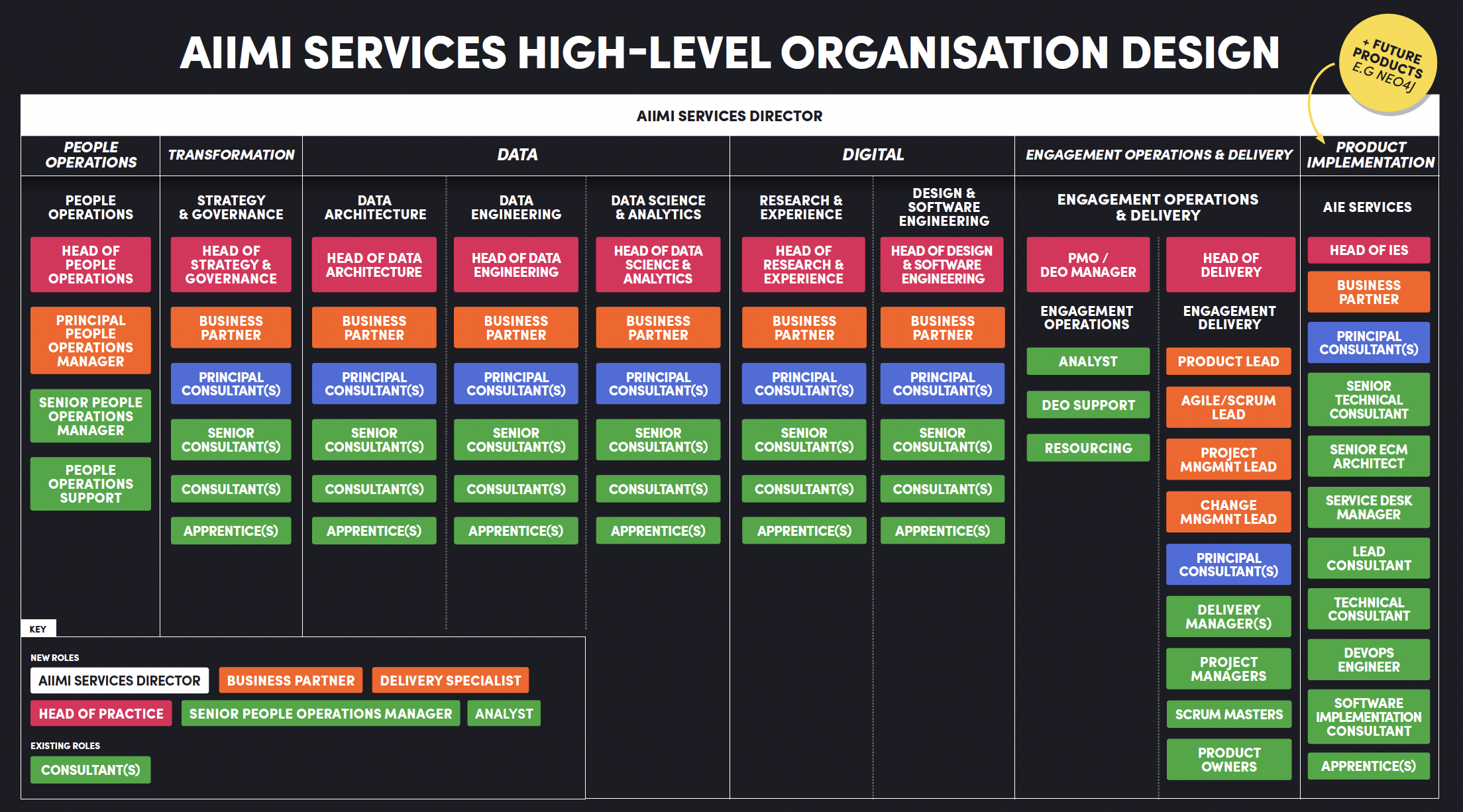
Head of Data & AI Engineering
Josh Swords
-
Technologies you're familiar with
- Azure stack
- PyTorch, sklearn
- Huggingface
-
What's your favorite technology to use and why
- FastAPI -- I love building things!
-
Fun fact / non technical skill you want to talk about
- I love to travel to off-beaten-path destinations
Business Partner(s)
Principal Data Consultant(s)
Ian Skelton
-
Technologies you're familiar with
- Databricks
- Delta Lake
- Azure Data Stack
- SQL Server BI Stack
- PowerBI
- MongoDb
- Terraform
- GIT
-
What's your favorite technology to use and why
- Right now, it has to be Databricks. It's come a long way in a relatively short space of time and handles pretty much all aspects of a Data Engineering pipeline.
-
Any DE/AI relevant courses/qualifications
- dbt Fundamentals
- AZ-104/AZ-305 - Azure Solutions Architect Expert
- AZ-104 - Azure Administrator Associate
- DP-203 - Azure Data Engineer Associate
- PL-300 - Power BI Data Analyst Associate
- PL-900 - Power Platform Fundamentals
- DP-900 - Azure Data Fundamentals
- AZ-900 - Azure Fundamentals
-
Fun fact / non technical skill you want to talk about
- My mastermind specialist subject would be The Simpsons, season 1-10!
Senior Data Consultant(s)
Suzanne Wallace
-
Technologies you're familiar with
- ADF/Databricks
- Azure Stack, Cosmos db
- Google Cloud Platform
- Amazon Web Services
- Open AI
- Terraform & IaC
- Devops/CICD/git
-
What's your favorite technology to use and why
Databricks - because you can process, transform and do analytics on data in one place. -
Any DE/AI relevant courses/qualifications
- DP-203 - Azure Data Engineer Associate
- AI-102 - Azure AI Engineer Associate
- AI-900 - Azure AI Fundamentals
-
Fun fact / non technical skill you want to talk about
- I'm going to start to learn Taekwondo!
Slater Stewart-Turner
-
Technologies you're familiar with
- ADF
- Databricks
- Snowflake
- Azure Stack
- AWS
- Devops/CICD/git
-
What's your favorite technology to use and why
- Databricks and Flask. Databricks because it's great to be able to do ELT all in one place and Flask for how easy it is to spin up an API if I have an idea!
-
Any DE/AI relevant courses/qualifications
- DP-203 - Azure Data Engineer Associate
-
Fun fact / non technical skill you want to talk about
- I love gaming and anime! I am also a massive fan of Japanese culture and plan to visit with my family soon!
Data Consultant(s)
Jake Pullen
-
Technologies you're familiar with
- ADF
- Databricks
- Azure Stack
- PowerBi
- Linux
- GIT
-
What's your favorite technology to use and why
Databricks, as it is a very powerful tool that can be used for a wide range of tasks and handles big data very well. -
Any DE/AI relevant courses/qualifications
- DP-203 - Azure Data Engineer Associate
- PL-300 - Power BI Data Analyst Associate (Lapsed)
-
Fun fact / non technical skill you want to talk about
- A covid success story. Before the pandemic I worked in retail. I was furloughed and used the time to learn.
Jon Bohnel
-
Technologies you're familiar with
- Databricks
- Azure
- GIT
- Grafana
-
What's your favorite technology to use and why
- Data wise - Databricks, it can already do lots of different jobs but more keeps being added all the time
- Outside of data - Selenium WedDriver, it is always pretty cool to watch the output of your code as the driver clicks around a webpage
-
Any DE/AI relevant courses/qualifications
- DP-203 - Azure Data Engineer Associate (In Progress)
-
Fun fact / non technical skill you want to talk about
- I run a 6-a-side football team in London
Adam Ault
-
Technologies you're familiar with
- Databricks
- Azure Stack
- PowerBi
-
What's your favorite technology to use and why
- Like most people at AIIMI I will say databricks. There always seems to be cool new features and the notebooks make collaboration really easy across large teams!
-
Fun fact / non technical skill you want to talk about
- I have watched over 3000 films and with all that data I built my own prediction model to calcuate what movies I will enjoy.
Data Apprentices(s)
Community of Practice for Data
...
New to the Water Industry?
Our very own Lindsey Furness has you covered!
I've created this resource for anyone at Aiimi who would benefit from an intro to the water sector.
It's deliberately pitched high-level, designed to hit the key points without being overwhelming or onerous,
but there's plenty of links if you want to go deeper.
Have a look, send feedback and please do send along to new employees as needed,
so we can send them into water-based client accounts on the front foot.
Miro Link
Consulting Basics
It's important that every engineer joining Aiimi knows the basics of consulting from the outset.
Project experience and your colleagues will be your best teachers but the headline is that our customers are paying a non-trivial amount for your expertise and opinions -- never forget this simple fact.
Your job
Day-to-day
Your job, simply, is to help the customer to solve their problems. This can include writing code and building cloud infrastructure but it can equally mean gathering requirements from users/stakeholders or writing documentation/recommendations at the end of a project.
Importantly, this will often include defining the problem in the first place. Therefore you need to ask questions (think why x5).
We all have our own expertises, interests and preferred activities but our job, at the end of the day, is to fulfill a need for a client and so we must be prepared to wear multiple hats.
How is consulting different?
Often as a developer, you are an employee of a company: your boss asks you to complete a series of tasks and you do them - your responsibility is to fulfill whatever your boss needs you to.
As a consultant, your responsibility to work with your Aiimi colleagues in close collaboration with a client to jointly deliver a project. This is not the same as working for the client - the client is not your boss!
Our aim is always to deliver a project that meets a clients needs, whilst also delivering on time and to-budget. This often means saying no or asking a client to prioritise the features that they want so work with your delivery manager to manage them dynamic
Project delivery
All being well, the Pre/Sales team will have agreed a well-defined Statement Of Work (SOW) with the client - this is a legal document detailing what Aiimi are responsible for delivering. The Aiimi delivery team for each project needs to achieve everything stated in this SOW, on time and on budget. This means:
- Agreeing what that SOW actually means in practice, building out the requirements for a project, and deciding the "definition of done" is often the first (and arguably most important) task in the project
- Managing the client's stakeholders' expectations throughout the project, making sure they are happy with what we're actually delivering, the progress we've made, and the tasks we're prioritising
This is achieved in Aiimi using the Scrum/Agile framework which can be delved into further elsewhere in this handbook.
At Aiimi, we succeed as a team and fail as a team - there are very few instances where there is just one person responsible for a mistake. It is up to all of us to challenge and support each other to ensure the success of a project.
Empathy, empathy, empathy
Putting yourself in the clients' shoes can help you to understand their motives, aims, pressures, etc. Attempt to truly understand their position.
How you present yourself
How you present yourself is critical. Aiimi employees are known by our clients as:
Expert - If you've joined Aiimi, then you are competent and effective so be confident and honest about your skills. Be intentional and present yourself as an authority: You don't have to know everything or claim to know everything, but you do need to develop the client's confidence in you/Aiimi.
Professional - This is always a tricky thing to quantify but the basics are being punctual, responding to communications with the same level of formality that they were sent with, and wearing what I'd describe as smart-casual on client site and casual in the office (do ask someone if you're unsure!).
Personable - Clients enjoy working with Aiimi, not just because of the quality of our work, but also because we're lovely people and form positive relationships. As you get deeper into a project, don't be afraid to get to know your colleagues on the client side better.
Aiimi's style isn't beige-corporate, but it is professional. Be inclusive and treat everyone with respect (which includes being willing them challenge them in order to ultimately help them!).
Communication
Communication is key. Articulate yourself clearly. Understand who you are talking to and their level of technical proficiency and tailor your words to suit the audience.
Think before every meeting/presentation/interaction:
- What is the purpose of this meeting?
- What do I want to get out of this?
- What do the other people on the call want to get out of this?
- How to I ensure all three of these elements are fulfilled.
Technical expertise
You need technical expertise. Does this mean you have to know the answer to every question? Absolutely not. Your aims should be to:
- Do the best you can with the information you have - you are not expected to be the fount of all knowledge but apply what you know and work/find out the rest.
- Do your best to network & research to find the answers (both internally and externally). There are plenty of experienced and friendly people you who will offer their support - ask them!
- Get practiced asking the client for more information - we're working together to complete this project and if what they need isn't clear, it's better to ask them than build something undesirable.
- Continuously learn - One reason why a company hires consultants is because they doesn't have their own in-house expertise or their experts are too stretched, so they pay extra for people who have an already established skillset. So, use your own initiative (and training days!) to stay at the sharp-end of what's possible in this fast-moving industry.
What makes Aiimi, Aiimi?
Aiimi's values are:
- Brave
- Expert
- Caring
- Integrity
Finally,
A personal piece of advice: Chat to people in the office (if you can make it to MK). Aiimi is full of kind, welcoming, and delightful people that would love to get to know you and will make your experience at Aiimi so rewarding. ...
Roles & Responsibilities of a Consultant Data Engineer
As a consultant data engineer, you play a crucial role in helping our clients harness the power of data to drive their business decisions. You'll need technical skills, but you'll also have other roles and responsibilities you may not have considered.
You are an expensive resource
Our clients are paying a non-trivial amount for your expertise and opinions -- never forget this simple fact.
You are also the face of aiimi. What you say and do counts.
Technical Expertise
First and foremost, you are to be a technical expert. This does not mean you have to know the answers to every question - that's impossible. we do however expect all of our consultants to have a genuine interest and passion for the tech industry, and research current and emerging trends.
You have been employed because we see that you can add value for our clients. But your journey as a data engineer continues...
Continuous Learning
Becoming a data engineer is only the first step. Our industry is moving faster than ever, and tt is imperative that you stay updated with the latest industry trends, tools, and best practices. Continuously learn and adapt to new technologies and methodologies.
A willingness to ask for help
Be brave. If you are unsure of which approach to take, ask for help. At aiimi the Community of Practice (CoP) for Data is a font of knowledge across many disciplines. If you are unsure, it is likely that someone else will be too.
Mentorship
Everyone at aiimi will have the opportunity to have a mentor, or indeed to be a mentor. This is a great opportunity for us all to learn. It is NOT about hierarchy, it is about sharing knowledge and experience across the organisation so that we, and our clients, all benefit.
Role Model
Whether you like it or not, you'll be a role model. This could be to the client, or to other aiimi engineers. Take this responsibility head on and consider this whenever you deliver a project or interact with people.
Requirement Gathering
Engage with clients to understand their business objectives, pain points, and data requirements. Often, clients may inadvertently lead you towards a technical solution which may not be suitable. Be prepared to challenge. You are the expert, and it is your moral duty to provide your opinion.
Proactive Attitude
Take initiative to identify and solve problems, and contribute to continuous improvement. This goes for your own development, too - take charge!
Understanding Scrum and Agile for Data Engineers
An introduction to Scrum & Agile working
There are numerous guides online about what Scrum is, its benefits, and more. Therefore this won't be an in-depth guide but rather a useful starting point which directs you to further learning.
Useful resources:
What is Agile?
Agile is a project management and development methodology that emphasises flexibility, collaboration, and customer-centric approaches. Unlike traditional methods, which rely on detailed upfront planning and a sequential process, Agile focuses on iterative progress, allowing teams to adapt to changes quickly and deliver value continuously. In the context of data engineering, Agile practices enable teams to respond to evolving data requirements, incorporate feedback, and deliver incremental improvements to data systems.
The Basics of Scrum
Scrum is a popular framework within Agile used to manage complex projects. It's designed to help teams work together efficiently, break down large tasks into manageable pieces, and continuously improve through regular feedback.
Key Components of Scrum
-
Scrum Team Roles:
- Product Owner: Represents the stakeholders and customers, ensuring the team works on the most valuable features. They prioritise the work (often in the form of a product backlog) and communicate the vision and goals to the team.
- Scrum Master: Facilitates the Scrum process, ensuring the team follows Agile principles. They remove obstacles that may hinder the team's progress and foster a collaborative environment.
- Development Team: A cross-functional group of professionals who do the work to deliver the product increment. In a data engineering context, this would typically include data engineers, data architects, and sometimes data analysts.
-
Scrum Artifacts:
- Product Backlog: A prioritised list of all the work that needs to be done. It includes user stories, features, enhancements, and fixes, all ordered by their value to the business.
- Sprint Backlog: A subset of the product backlog that the team commits to completing during a sprint. It’s the plan for the current sprint and includes specific tasks required to meet the sprint goal.
- Increment: The sum of all completed backlog items during a sprint and the value they add to the product. For data engineers, an increment might be a new ETL process, an updated data pipeline, or a deployed data model.
-
Scrum Events:
- Sprint: A time-boxed period, usually 1-4 weeks, during which the team works to complete a set of tasks from the sprint backlog. Sprints are the heartbeat of Scrum, ensuring regular and consistent progress (the general timeframe is 2 weeks on most projects).
- Sprint Planning: A meeting where the team discusses what can be delivered in the upcoming sprint and how they’ll achieve it. The result is the sprint backlog and a clear sprint goal.
- Daily Scrum (Stand-Up): A short daily meeting where the team discusses their progress since the last meeting, their plan for the day, and any blockers they’re facing. This keeps everyone aligned and allows for quick adjustments.
- Sprint Review: At the end of the sprint, the team demonstrates what they’ve accomplished to stakeholders. This provides an opportunity for feedback and helps align future work with stakeholder expectations.
- Sprint Retrospective: A reflection meeting where the team discusses what went well, what didn’t, and how they can improve in the next sprint. Continuous improvement is a core principle of Scrum.
How Scrum and Agile Fit into Data Engineering
In data engineering, where requirements can often change based on new insights or business needs, Agile and Scrum provide a structured yet flexible approach to manage work. By breaking down large tasks like data pipeline creation or database migration into smaller, iterative pieces, teams can deliver value faster and more reliably.
For example, instead of building an entire data warehouse in one go, an Agile approach might involve creating the initial schema and loading a small subset of critical data in the first sprint. Subsequent sprints could focus on adding more data sources, refining the ETL processes, or improving data quality. This iterative approach allows for regular feedback and adjustments, ensuring the final product meets business needs more closely.
Why It Matters
Understanding and applying Scrum and Agile principles will help you collaborate more effectively with your team, prioritise work that delivers the most value, and adapt to changing requirements. As a data engineer, this means you’ll be better equipped to deliver high-quality data solutions that align with the needs of the business in a timely manner.
Our Tech Stack and Learning Pathways
Our Tech Stack
Given that we are consultants, the technology we use can vary widely depending on the clients' needs. However, we often operate in the Azure eco-system and so there are some common components which will help you get up to speed.
Languages
Before delving into the commonly used components, let's first discuss the programming languages you should seek to become an expert in:
- Python (PySpark)
- SQL
You should understand Spark/Distributed Compute
Technology
Platforms
-
Databricks: This should be the platform you invest most effort in becoming expert in.
-
Azure Synapse Analytics: This platform is secondary to Databricks, however the Pipelines feature (formerly known as Azure Data Factory) is also worth learning.
The Azure eco-system is huge, however the components that we use most commonly are:
- Blob Storage / Data Lake
- Serverless SQL Pool (Synapse Analytics)
- Dedicated SQL Pool (Synapse Analytics)
- Event Hub (For event-triggered pipelines)
Less commonly used, but important:
- CosmosDB (Advanced)
Version Control
Version control should be utilised on all client projects. The exact tooling may vary, but typically it is:
- GitHub
- Azure DevOps Repos
Power BI
Power BI is a useful tool that offers numerous advantages for data engineers. Here are some ways it can be used:
- Data Integration: Power BI can connect to a wide variety of data sources, including databases, cloud services, and on-premises data warehouses. Allowing you to integrate diverse data sets into a single platform.
- Data Transformation: With Power Query, data engineers can clean, transform, and reshape data before loading it into Power BI. This capability simplifies the ETL (Extract, Transform, Load) process and ensures that the data is in the right format for analysis.
- Visualization and Reporting: Power BI provides robust visualization tools that help data engineers create interactive and insightful dashboards and reports. This makes it easier to communicate complex data insights to stakeholders.
- Data Modeling: Power BI includes features for creating data models, defining relationships, and creating calculated columns and measures.
- Data Sharing: Power BI allows for easy sharing and collaboration. Data engineers can publish reports and dashboards to the Power BI service, making it accessible to team members and stakeholders.
- Integration with Azure: Power BI integrates with Azure services, enhancing capabilities around data storage, processing, and advanced analytics.
Coming Soon...
- dbt
Learning Pathways
Aiimi will cover costs for you to gain certifications on MSLearn or Databricks. Many colleagues have completed these certifications, so feel free to ask for help.
Databricks
Browse all Databricks certifications
If you are brand new to Databricks, watch this Lakehouse Fundamentals video
For more advanced topics, we suggest:
Azure Eco-System
For any Microsoft course, visit the Microsoft Learn Platform
The certifications we suggest are:
Power Bi
Power Bi is used by many clients so it is advisable to be familiar with it. The course below provides a good overview of transforming data, creating data models, visualising data, and sharing assets.
Programming
Engineering Roadmap
Scrum
Useful resources:
Getting Started with Git
As with the rest of the onboarding pack, this is not intended to teach you Git. Rather it is supposed to serve as a helping hand.
A solid option is to use GitHub Desktop.
However, many engineers prefer to use the terminal. If you're one of those, here are some useful actions.
Important Actions to Understand in Git
-
Clone: Copy an existing Git repository to your local machine.
-
Branch: Create separate lines of development.
-
Add: Stage changes to be committed.
-
Commit: Save changes to the local repository.
-
Push: Upload local repository content to a remote repository.
-
Pull: Fetch and merge changes from a remote repository to your local repository.
-
Merge: Combine changes from different branches.
Examples
- Clone a Repository To copy an existing Git repository to your local machine:
git clone https://github.com/your-username/repo-name.git
- Create a New Branch To create a new branch for your changes:
git checkout -b your-new-branch-name
- Add Changes
git add .
- Commit Changes
To save changes to the local repository with a clear, concise message:
git commit -m "your commit message"
- Push Changes To upload your local repository content to a remote repository:
git push origin your-new-branch-name
- Pull Changes
To pull and merge changes from a remote repository to your local repository:
git pull origin main
- Merge Branches To combine changes from different branches:
The existing branch:
git checkout main
Merge with your new branch:
git merge your-new-branch-name
Common Architectural Patterns
Architectural design choices must be made based on the use case at hand and intended data access patterns (also see dataModelling.md). However, some designs appear more than others.
Lake-based Architectures
Lake-based architectures leverage data lakes to store large volumes of raw and processed data in a flexible and scalable manner. These architectures are commonly used for big data analytics and machine learning use cases.
In the Azure stack, this means heavily utilising blob storage (also referred to as Azure Data Lake Storage)
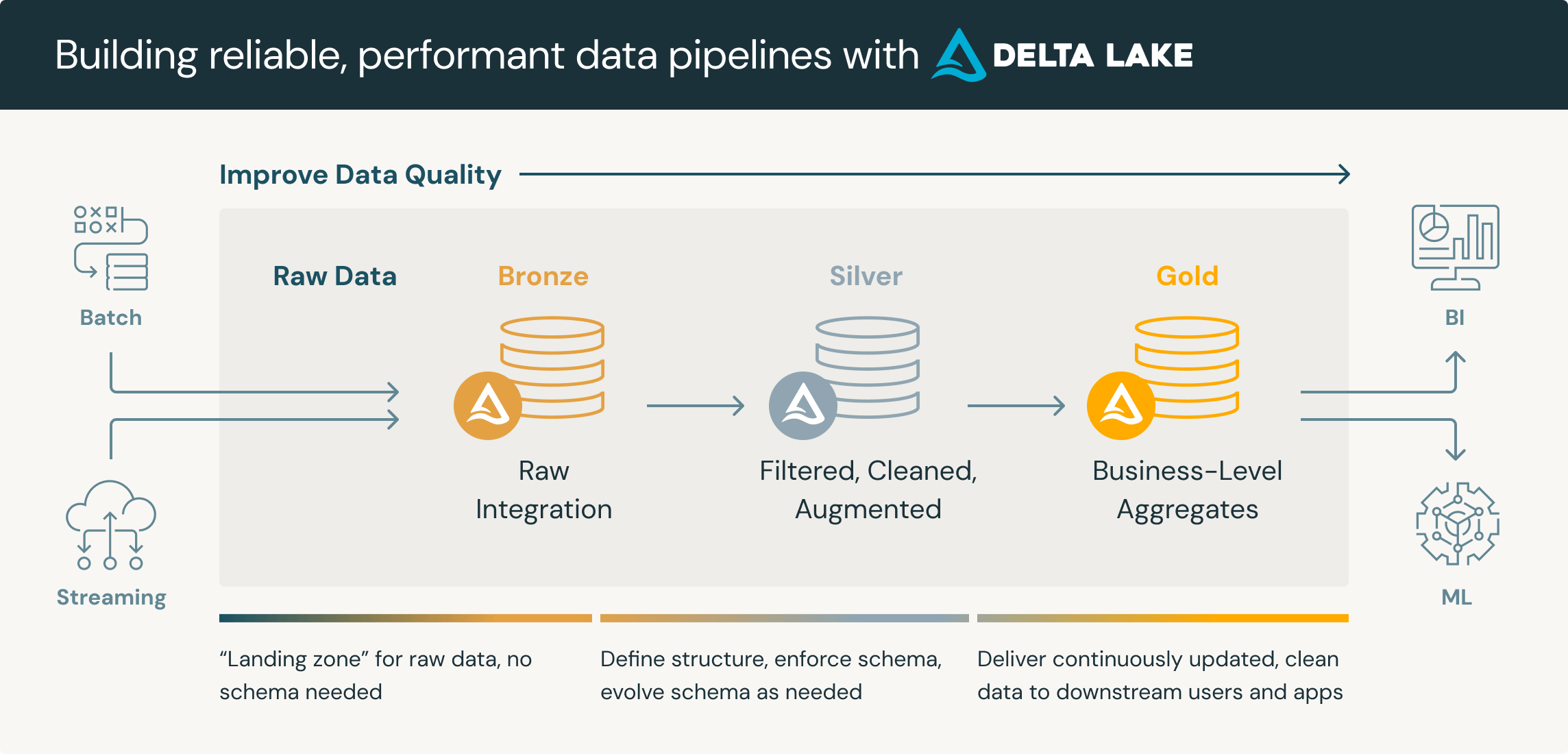
Medallion Architecture
The Medallion Architecture, also known as the "bronze, silver, gold" , or "Multi-Hop" architecture, organises data in a layered approach within a data lake. Data is ingested into the "bronze" layer, refined in the "silver" layer, and enriched for business use in the "gold" layer.
It's important to note that the layers are guidelines. In practice, we may have many more layers for differing purposes. For example, we may have an initial "Landing" layer for inbound data. There might be several phases within a "Silver" layer for different use cases.
Also worth noting is that the naming convention of "bronze, silver, gold" is also fluid. For example it may be referred to as "raw, conform, base, curated". Where 'raw' is the literal raw data. 'Conform' converts all data to the same file format, such as parquet or delta. 'Silver' is where quality rules are applied. 'Gold' is the 'warehousing' layer, etc.
The core principle is that we begin with raw unprocessed data which provides a single source of the truth, and then we progressively increase quality until the "gold" or "curated" report-ready data.
Why?
Enhances data quality, provides scalability, more granular access control, can handle various file types, etc.
Write-Audit-Publish
Write-Audit-Publish (WAP) is a data processing pattern that ensures data integrity and auditability.
Data is first written to a raw layer, then audited for quality and compliance, and finally published for consumption. It is similar to the Medallion Architecture but subtly different.
Why?
Ensures data is validated and compliant before consumption and enhances data quality through systematic auditing.
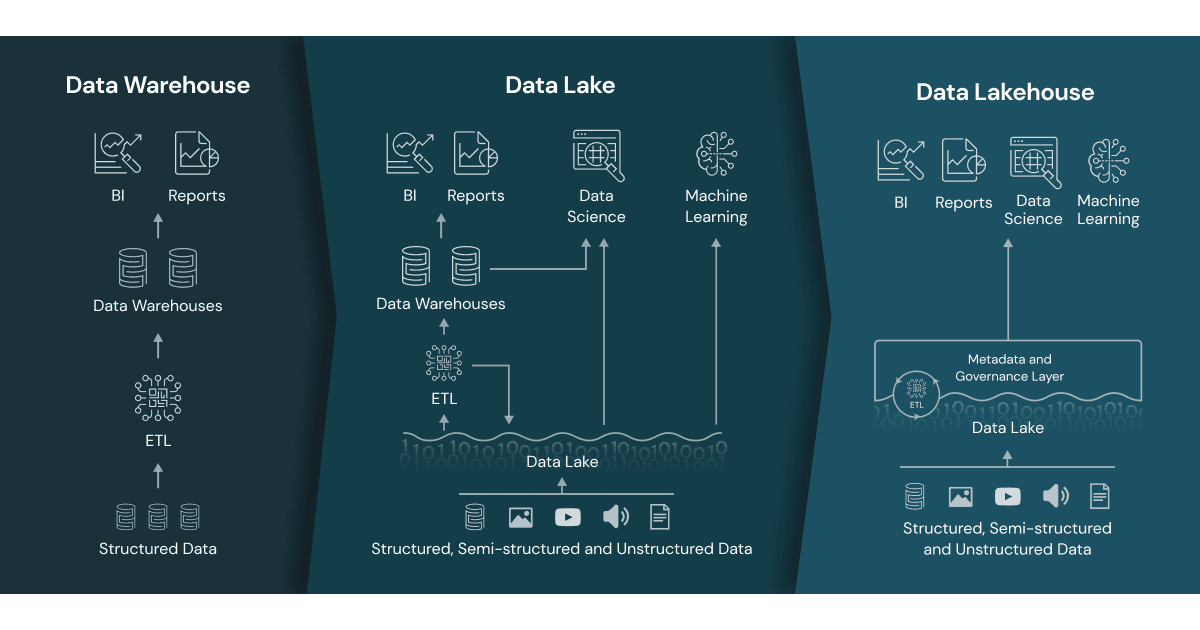
The above architectures lend themselves to a Data Lakehouse architecture, which we commonly employ.
A data lakehouse is a modern data architecture that creates a single platform by combining the key benefits of data lakes (large repositories of raw data in its original form) and data warehouses (organised sets of structured data). Specifically, data lakehouses enable organizations to use low-cost storage to store large amounts of raw data while providing structure and data management functions.
Data lakehouse vs. data lake vs. data warehouse
The term “data lakehouse” merges two types of existing data repositories: the data warehouse and the data lake. So, what exactly are the differences when it comes to a data lakehouse vs. data lake vs. data warehouse?
Data warehouses
Data warehouses provide fast access to data and SQL compatibility for business users that need to generate reports and insights for decision-making. All data must go through ETL (extract, transform, load) phase. This means it is optimised in a specific format, or schema, based on the use case before it is loaded to support high-performance queries and data integrity. However, this approach limits the flexibility of access to the data and creates additional costs if data needs to be moved around for future use.
Data lakes
Data lakes store large amounts of unstructured and structured data in its native format. Unlike data warehouses, data is processed, cleaned up, and transformed during analysis to enable faster loading speeds, making them ideal for big data processing, machine learning, or predictive analytics. However, they require expertise in data engineering, which limits the set of people who can use the data, and if they’re not properly maintained, data quality can deteriorate over time. Data lakes also make it more challenging to get real-time queries as the data is unprocessed, so it still potentially needs to be cleaned, processed, ingested, and integrated before it can be used.
Data lakehouse
A data lakehouse merges these two approaches to create a single structure that allows you to access and leverage data for many different purposes, from BI to data science to machine learning. In other words, a data lakehouse captures all of your organization’s unstructured, structured, and semi-structured data and stores it on low-cost storage while providing the capabilities for all users to organize and explore data according to their needs.
Other Notable Architectures
Lambda, Kappa, etc. To do.
Concepts
The importance of file formats
File formats are an often overlooked yet crucial part of data engineering. They determine how data is stored, compressed, and accessed. Choosing the right file format can impact data processing speed, storage efficiency, and interoperability with other systems. Common file formats include:
- CSV:
CSV are probably the dataset you'll have handled the most, and it is fine for small datasets. However, it is incredibly inefficient. To filter csv data, we first have to read the entire dataset, and then reduce it to what we need.
- Parquet:
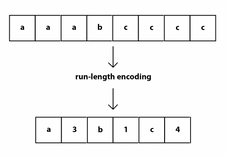
An incredibly scalable data format, Parquet powers the modern data type boom (Delta, Iceberg), and so it is important to understand it. Parquet benefits from run-length-encoding - the idea is to replace consecutive occurrences of a given symbol with only one copy of the symbol, plus a count of how many times that symbol occurs—hence, the name run length. This enables massive compression of data when ordered correctly.
In addition, parquet is column-oriented. This means that we can read in only the columns of data we are interested in, rather than reading in all the data and then selecting what we need.
- Delta:
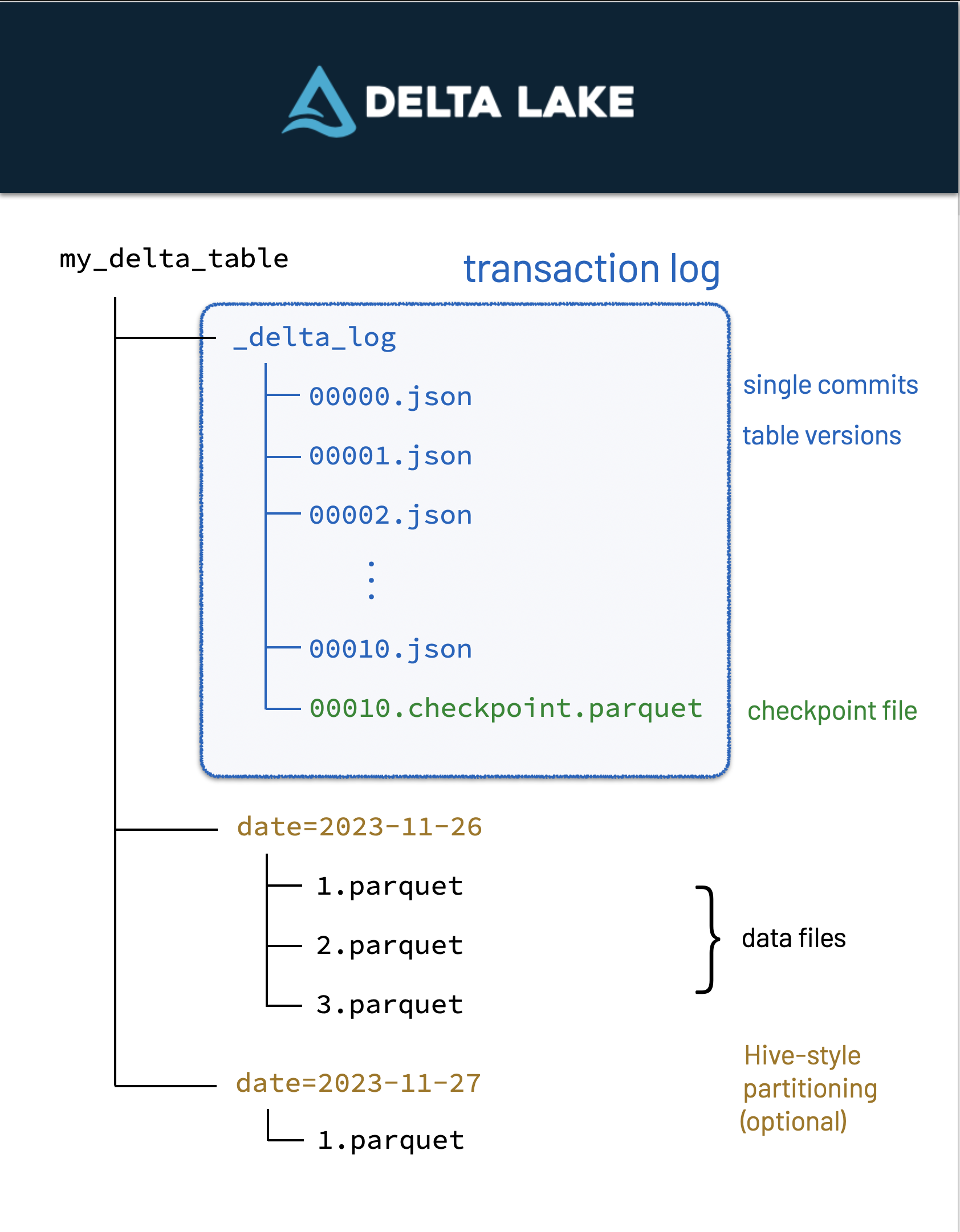
Delta files are built-on parquet files - which means it has all of parquet's benefits plus more. Delta Lake uses versioned Parquet files to store your data in your cloud storage. Apart from the versions, Delta Lake also stores a transaction log to keep track of all the commits made to the table or blob store directory to provide ACID transactions.
Partitioning
Partitioning is the process of dividing a dataset into smaller, more manageable parts. This can improve query performance by reducing the amount of data that needs to be scanned. Common partitioning strategies include:
-
Range partitioning: Dividing data into ranges based on a specific column, such as date or ID.
-
Hash partitioning: Dividing data into buckets based on a hash function applied to a specific column.
-
List partitioning: Dividing data into lists based on specific values in a column.
Partitioning can be done on disk or in memory, and can be static or dynamic. It is important to choose the right partitioning strategy based on the characteristics of your data and the queries you need to run.
ETL/ELT
Pros and cons of ETL vs ELT:
-
ETL is better for traditional data warehousing, where data is cleaned and transformed before being loaded into the warehouse. This makes it easier to analyse the data, but can be slower and more resource-intensive.
-
ELT is better for big data and cloud-based data warehousing, where data is loaded into the warehouse first and then transformed. This can be faster and more scalable, but can also be more complex and harder to manage.
-
ETL is better for structured data, where the schema is known in advance.
-
ELT is better for unstructured or semi-structured data, where the schema may change over time.
Typically in our data engineering role we should know when is best to use either ETL or ELT, and be able to implement both.
OLAP & OLTP
OLAP (Online Analytical Processing) systems are designed to handle complex queries and large volumes of data, and are primarily used for business intelligence and data analysis. OLAP systems are optimised for read-heavy workloads, and are typically used to generate reports, dashboards, and other analytical outputs.
OLTP (Online Transaction Processing) systems are designed to handle high volumes of transactions, and are primarily used for transactional workloads such as e-commerce, banking, and other real-time applications. OLTP systems are optimised for write-heavy workloads, and are typically used to process transactions, update records, and perform other real-time operations.
Typically in our data engineering role we pull data from OLTP systems, transform it, and load it into OLAP systems for analysis. However we should also consider the use of OLAP systems for real-time analytics, and OLTP systems for batch processing, being able to implement both.
ACID Transactions
ACID (Atomicity, Consistency, Isolation, Durability) transactions are a set of properties that guarantee the reliability and consistency of database transactions. ACID transactions ensure that database operations are completed successfully and that data is not lost or corrupted.
-
Atomicity: All operations in a transaction are completed successfully, or none of them are completed at all.
-
Consistency: The database remains in a consistent state before and after a transaction.
-
Isolation: Transactions are isolated from each other, so that the results of one transaction do not affect the results of another.
-
Durability: Once a transaction is committed, its results are permanent and cannot be undone.
ACID transactions are essential for maintaining data integrity and reliability in database systems, and are a key consideration in data engineering.
Distributed Compute
Distributed computing is a computing paradigm in which multiple computers work together to solve a problem or perform a task. Distributed computing can improve performance, scalability, and fault tolerance by distributing workloads across multiple machines.
This way of working is essential for big data processing, as it allows us to process large volumes of data quickly and efficiently, something that would be impossible with a single machine.
Approaches to Data Modelling
Data modelling is an art, not a science. Data modelling is the process of structuring data to support efficient storage, retrieval, and use. The success of any data model hinges on an understanding of the intended use cases and the skills of the end users. All choices have trade-offs.
As we are consultants, we need to approach any problem with the customer in mind - they will inherit the build and therefore need to be comfortable with the solution.
The headline is: work backwards. Let's explain what that means...
Work backwards: Build understanding
Your first areas of focus should be:
- Data access patterns:
- How do you anticipate end-users will interact with the data? Are they always retrieving single records? Or do they need access to large swathes of data, e.g. grouped by a key variable? Do they always filter by certain fields? How will the data literally be accessed? (BI tools, CLoud platforms such as Databricks, Snowflake etc)
- Business goals & aspirations:
- The model you build must be suitable for current use cases, but also take the time to understand the future aspirations of the client. Do they anticipate scaling rapidly? Do they want to introduce streaming data?
- End-user skills:
- Who are your end-users? Are you designing a model which will be used by skilled data analysts? Or are you designing a model which will be served directly to external customers?
- The broader architecture of the solution:
- Where will the data be surfaced? Will any subsequent processes consume the data?
- Data types
- Is the data in question structured, semi-structured, unstructured, or a combination?
Once you understand these issues, you can make a more well informed decision on what to build.
Approaches to Relational Modelling
Kimball
Kimball is a dimensional modelling approach. It is designed to make data more accessible to end-users, and is particularly suited to data warehousing and business intelligence applications. The Kimball approach is based on the idea of a star schema, where a central fact table is surrounded by dimension tables. This makes it easy to query the data and generate reports.
Proper understanding of the Kimball approach is essential for any data engineer working in the field of business intelligence, however we should not be scared to deviate from this approach if the use case demands it. No one approach is perfect for every situation.
One Big Table (OBT)
The One Big Table approach is the opposite of the Kimball approach. Instead of breaking the data down into smaller tables, the One Big Table approach combines all the data into a single table. This can make it easier to query the data, but can also make it harder to manage and maintain.
The One Big Table approach is not as widely used as the Kimball approach, but it can be useful in certain situations. For example, if you have a small dataset that is not going to change very often, the One Big Table approach might be a good choice.
One Big Table is also a good choice if your end-users are not very skilled in data analysis, as it can make the data more accessible to them.
Inmon
Less bothered about this, but still to do...
Approaches to NoSQL Modelling
Focussing on Azure CosmosDB (Horiz. scaling, partitioning (PK), access patterns etc)
To do
Flesh out my "block design" for NoSQL...
{
  "id": "123-456-789",
  "discriminator": "guide",
  "details": {
    "title": "Approaches to Data Modelling",
    "topic": "NoSQL",
    "skillRequired": 10,
  },
  "documentMetadata: {
    "createdOn": "...",
    "createdById": "..."
    ...
  }
}
ETL/ELT Patterns
Batch
Streaming
DocGen
An application to normalise and automate a large portion of documentation for Data Engineers
How To
The hard part first, you need to output your data product in the format of the example data product yaml file.
This is bespoke per client as they could be using Oracle/sql server/databricks/Azure/AWS/GCP... The general idea is to get all required tables and columns that the end product uses as a source and also all the details of the data product.
Now the easy part.
Import the DocGen class, and point it at your yaml file.
Each table(Entity) should have a type of Bronze, Silver or Gold. Following the medallion archetecture of todays engineering standards.
- The gold tables will get mapped into an ERD.
- The entire product will get a markdown table with all the tables and details around that.
- the entire product will get a lineage flow chart.
The aiimi Data Product
Maintained by: The aiimi Data Engineers
Table overview
| Entity ID | Entity Name | Description | Entity Type | Primary Key(s) |
|---|---|---|---|---|
| 1 | transactions | Transaction Fact Table One line per transaction, but only transactions that have actually happened. | gold | transaction_id |
| 2 | scheduled_transactions | Scheduled Transaction Fact Table One line per transaction, but only transactions that have not actually happened. | gold | scheduled_transaction_id |
| 3 | accounts | Accounts Dimension Table Holds all the information relating to an account, type 1, 1 line per account. | gold | account_id |
| 4 | categories | Categories Dimension Table Holds all the information relating to a category, type 1, 1 line per category. | gold | category_id |
| 5 | payees | Payees Dimension Table Holds all the information relating to a payee, type 1, 1 line per payee. | gold | payee_id |
| 6 | dates | Good old fashioned Date Dimension | gold | date_id |
| 7 | accounts | Silver Accounts Table Other random information. | silver | |
| 8 | categories | Silver Categories Table Other random information. | silver | |
| 9 | payees | Silver Payees Table Other random information. | silver | |
| 10 | scheduled_transactions | Silver Scheduled Transactions Table Other random information. | silver | |
| 11 | transactions | Silver Transactions Table Other random information. | silver | |
| 12 | accounts | bronze | ||
| 13 | categories | bronze | ||
| 14 | payees | bronze | ||
| 15 | scheduled_transactions | bronze | ||
| 16 | transactions | bronze |
Entity Relationship Diagram
erDiagram
    transactions {
        string transaction_id PK
        int account_id
        int category_id
        int payee_id
        int date_id
        decimal amount
        boolean cleared
        boolean approved
        boolean deleted
        string memo
        string flag_color
        string transfer_account_id
    }
    scheduled_transactions {
        int scheduled_transaction_id PK
        int account_id
        int category_id
        int payee_id
        str date_first
        str date_next
        decimal amount
        string frequency
        boolean deleted
        text memo
        string flag_color
        str transfer_account_id
    }
    accounts {
        int account_id PK
        string account_name
        string account_type
        boolean on_budget
        boolean closed
        text note
        decimal balance
        decimal cleared_balance
        decimal uncleared_balance
        boolean deleted
    }
    categories {
        int category_id PK
        string category_name
        string category_group_name
        boolean hidden
        text note
        decimal budgeted
        decimal activity
        decimal balance
        boolean deleted
    }
    payees {
        int payee_id PK
        string payee_name
        boolean deleted
    }
    dates {
        string date_id PK
        date date
        int year
        int month
        int day
        boolean is_weekday
        int weekday
    }
    transactions ||--|| payees : "payee_id"
    transactions ||--|| dates : "date_id"
    scheduled_transactions ||--|| payees : "payee_id"
    transactions ||--|| categories : "category_id"
    transactions ||--|| accounts : "account_id"
    scheduled_transactions ||--|| accounts : "account_id"
    scheduled_transactions ||--|| categories : "category_id"
Lineage Report
%%{init: {"flowchart": {"defaultRenderer": "elk"}} }%%
flowchart LR

1[1 gold transactions]
2[2 gold scheduled_transactions]
3[3 gold accounts]
4[4 gold categories]
5[5 gold payees]
6[6 gold dates]
7[7 silver accounts]
8[8 silver categories]
9[9 silver payees]
10[10 silver scheduled_transactions]
11[11 silver transactions]
12[12 bronze accounts]
13[13 bronze categories]
14[14 bronze payees]
15[15 bronze scheduled_transactions]
16[16 bronze transactions]


11 --> 1
10 --> 2
7 --> 3
8 --> 4
9 --> 5
12 --> 7
13 --> 8
14 --> 9
15 --> 10
16 --> 11
Advanced Techniques
Data Pipeline Best Practices
While best practices provide a solid foundation for building robust and efficient data pipelines, it's important to recognise that each clients needs and constraints are unique. The specifics of the data sources, the nature of the data being processed, the regulatory landscape and the desired outcomes all play critical roles in shaping the design and implementation of your pipeline.
Therefore, while best practices offer general guidelines, it's crucial to tailor them to your particular context. This might involve prioritising certain aspects over others, adapting techniques to fit your infrastructure, or innovating new solutions that better meet your specific challenges. Ultimately, a successful data pipeline is one that aligns closely with your clients goals and requirements, balancing best practices with practical considerations to achieve optimal performance and reliability.
With the above caveat in mind, here are some best practices to consider when implementing a data pipeline.
Understanding Your Source Systems
During the design of a data pipeline, it is important to consider the limitations, capabilities and nuances of the source systems from which data is being extracted. Overburdening these systems can lead to performance degradation, angry source system owners and even outages. Here are some strategies and considerations to ensure that data extraction processes are efficient and non-disruptive:
-
System Performance and Capacity: Before designing the data extraction process, evaluate the source systems performance characteristics and capacity limits. Interviewing the source systems technical team or owner can give a good insight into this.
-
Read-Replicas / Built-in Services: Where possible, use features that are baked into the source system such as read-replicas and standby databases to offload data extraction from the source system. Use any built-in APIs or services provided by the source system, these are often optimised for data extraction. Using these pre-existing services reduces the load on the primary system and can improve the overall performance and reliability of the data extraction process. Again, having a relationship with the source system owner will ensure that you are aware of all the possible options.
-
Incremental Source System Loads: Instead of extracting full datasets, use incremental data loading techniques. If the source system already has change tracking techniques baked in, those can be utilised if your pipeline. See the Incremental Loads section for more details.
-
Scheduled Loading Windows: Schedule data extraction during off-peak hours or periods of low activity on the source system. This reduces the risk of contention and minimises the impact on the users of the system.
Choosing the Right Tool for the Job
Selecting the appropriate tools and tech stack for your data pipeline is an important step. The choice of tools depends on various factors, including the type and volume of data, processing needs, the specific goals of the pipeline and the type of consumers at the pipelines destination. Here are some considerations for choosing the right tool for your data pipeline.
-
Data Characteristics: Identify the types of data you will be handling (structured, unstructured, or semi-structured), their formats and their volume and velocity.
-
Processing Requirements: Determine whether your pipeline needs to handle real-time data streams or batch processing. Some tools are optimised for real-time analytics, while others excel in batch processing. See the Batch and Streaming sections for more details.
-
Scalability and Flexibility: Consider the scalability needs of your pipeline. Choose tools that can scale horizontally to handle growing data volumes and are flexible enough to accommodate changes in data sources or processing requirements if the volume/velocity of data is expected to change over time.
-
Source / Destination Compatibility: Ensure the tools you choose can integrate well with your data sources and destinations. For example, if your data sources are all cloud based, hosted in Microsoft Azure, data tools in the Azure tech stack (e.g. Azure Data Factory, Azure Synapse Analytics, Fabric) might be more appropriate.
-
Cost and Budget Considerations: When choosing a tool, it is prudent to be aware of the potential costs. Typically, costing solutions is very challenging given the amount of variables that can have an impact on the cost. Using a cost/benefit approach that utilises relative costs helps in the decision making process.
-
Consider Your Consumers: Knowing your audience is important when choosing the tools for the pipeline. For example, if the pipelines primary purpose is to facilitate making data available to report developers, choosing a tool aligns to the reporting teams existing programming skills (e.g a tool that allows querying data via SQL) will be beneficial and aid adoption.
Incremental Loads
An incremental load is the selective movement of data from one system to another. An incremental load pattern will attempt to identify the data that was created or modified since the last time the load process ran. This differs from a full data load, which copies the entire set of data from a given source. The selectivity of the incremental design usually reduces the system overhead required for the loading portion of the data pipeline.
The selection of data to move is often based on time, typically when the data was created or most recently updated. In some cases, the new or changed data cannot be easily identified solely in the source, so it must be compared to the data already in the destination for the incremental data load to function correctly.
Benefits of the Incremental Load
-
Speed: They typically run considerably faster since they touch less data. Assuming no bottlenecks, the time to move and transform data is proportional to the amount of data being touched.
-
Reduced Risk: Because they touch less data, the surface area of risk for any given load is reduced. Any load process has the potential of failing or otherwise behaving incorrectly and leaving the destination data in an inconsistent state.
-
Consistent Performance: Incremental load performance is usually steady over time. If you run a full load, the time required to process is monotonically increasing because today’s load will always have more data than yesterday’s. Because incremental loads only move the delta, you can expect more consistent performance over time.
When to use the Incremental Load
The decision to use an incremental or full load should be made on a case-by-case basis. There are a lot of variables that can affect the speed, accuracy and reliability of the load process.
- The size of the data source is relatively large
- Querying the source data can be slow, due to the size of the data or the technical limitations
- There is a viable means through which changes can be detected
- Data is occasionally deleted from the source system, but you want to retain deleted data in the destination
How to implement an Incremental Load
For loading just new and changed data, there are two broad approaches on how to handle this.
-
Source Change Detection: This is a pattern in which we use the selection criteria from the source system to retrieve only the new and changed data since the last time the load process was run. This method limits how much data is pulled into the data pipeline by only extracting the data that actually needs to be moved, leaving the unchanged data out of the incremental load cycle. Detecting changes in the source is the easiest way to handle delta detection, but it’s not perfect. Most of the methods for source-side change detection require that the source resides on a relational database, and in many cases, you’ll need some level of metadata control over that database. This may not be possible if the database is part of a vendor software package, or if it is external to your network entirely.
-
Destination Change Comparison: If the source for a given data pipeline doesn’t support source change detection, you can fall back to a source-to-destination comparison to determine which data should be inserted or updated. This method of change detection requires a row-by-row analysis to differentiate unchanged data from that which has recently been created or modified. Because of this, you’ll not see the same level of performance as with source change detection. To make this work, all the data (or at least the entire period of data that you care about monitoring for changes) must be brought into the data pipeline for comparison. Although it doesn’t perform as well as source-side change detection, using this comparison method has the fewest technical assumptions. It can be used with almost any structured data source.
Idempotency
Generally, an operation is termed idempotent if it can be applied multiple times without changing the result beyond its initial application. In terms of data pipelines, idempotence means that no matter how many times you execute the pipeline, the outcome should stay consistent after the first execution.
Idempotency in Data Pipelines
Specifically, data pipelines should exhibit the following properties which contribute to them being considered idempotent.
- When re-executing a data pipeline, data should not be duplicated downstream.
- If the pipeline breaks or is down for a day, the next run should catch up.
- Whether running the pipeline today or historically, it should not result in, or cause unintended consequences.
How to implement an Idempotent Pipeline
Generally speaking, to achieve an idempotent pipeline, every time data is curated and persisted to disk, the write process should honour the above principals. Following the below strategies will help with this.
- Use a mechanism to identify each unique record:
- Use unique keys or natural keys to identify records. This will allow you to use upsert statements or other mechanisms to ensure that data is only inserted or updated if it doesn’t already exist.
- If no such key is present in the source data, use a form of hashing to to create your own. Most database management systems come with hashing functions out of the box.
- Replacing existing rows with new values from the source row (upserting using a MERGE statement):
-
Using a MERGE statement allows inserting/updating/deleting in a single atomic operation by using the unique record key.
-
For example, the below MERGE statement compares a source table to a target table based on a key column. If a target row is detected, it is updated. If a target row is not found, it is inserted.
MERGE INTO target USING source ON source.key = target.key WHEN MATCHED THEN UPDATE SET * WHEN NOT MATCHED THEN INSERT * -
MERGE syntax and functions vary by tech stack but generally the concept is the same. See the below link for the Databricks/Delta specific implementation.
https://learn.microsoft.com/en-us/azure/databricks/delta/merge
-
Error Handling
Error handling is the practice of automating error responses/conditions to keep the pipeline running or alerting relevant individuals/teams. The following approaches detail methods for handling errors.
-
Retry Mechanisms: Pipelines often fail due to scenarios that are outside of our control such as network issues, hardware failures or other transient issues. Building in an automated retry mechanism will ensure that a pipeline can gracefully handle these scenarios. Be mindful to set a sensible maximum retry limit.
-
Alerting: Alerts might come in the form of an email or direct message on a clients preferred messaging platform. When alerting, be mindful of alert fatigue. Alert fatigue refers to an overwhelming number of notifications which results in recipients ignoring them. Be sure to reserve alerts for scenarios that cannot be ignored.
-
Logging: Logging the executions of a pipeline as well as any error conditions will help with troubleshooting. Logging options depend on the tech stack being used and how the pipeline is orchestrated so there is no one-size-fits-all approach. However, it's important that an appropriate execution history is persisted in some way to understand the scope of a potential issue.
Pandas or Polars?
Pandas and Polars are both popular data manipulation libraries in Python. Here's a quick breakdown of their pros and cons:
Pandas
| Pros | Cons |
|---|---|
| Mature and widely used library with extensive documentation and community support. | Can be memory-intensive for large datasets due to its reliance on NumPy arrays. |
| Offers a wide range of data manipulation and analysis functionalities. | Performance is usually slower compared to Polars. |
| Pandas integrates well with other popular Python libraries such as NumPy, Matplotlib, and SciPy, enhancing its capabilities for data analysis and visualization. | Limited support for parallel processing and distributed computing. (it normally runs on a single thread) |
Polars
| Pros | Cons |
|---|---|
| Designed for high-performance data manipulation and analysis. | Relatively new library with a smaller community compared to Pandas. |
| Utilizes Rust under the hood, resulting in faster execution times. | Resources may be more limited. |
| Supports lazy evaluation, enabling efficient handling of large datasets. | Some advanced features available in Pandas may not be fully implemented in Polars yet. |
| Provides a convenient API similar to Pandas, making it easy to transition between the two. | |
| Offers parallel processing capabilities out of the box, for improved performance. |
Polars Technical Details
Polars being built in rust ensures that it doesnt use any other python libraries like pandas uses numpy, this way it can then utilise multiple threads and cores to process data, something that pandas cannot do.
Rust also uses the Arrow memory format, this is also used by other big data tools like Apache Spark, Parquet files and the Cassandra database.
Polars also has a lazy evaluation engine, this means that it can optimise the execution of the code, this is similar to how Spark or SQL works. In contrast pandas will execute the code line by line, with no optimisations.
Conclusion
While Polars is the less mature option, I encourage data engineers to explore its capabilities, especially when dealing with large datasets or performance-critical applications.
Documentation
Mermaid Diagrams
Mermaid is a tool for creating diagrams in markdown. It is useful for creating flowcharts, sequence diagrams, gantt charts, and more. The diagrams are created using a simple syntax that is easy to learn and use.
Free and Open Source
Mermaid is a free and open source tool that is available on GitHub it also has an easy to use web front end at Mermaid.live. This makes it easy to get started with Mermaid and create diagrams quickly.
Use Cases
ETL
Lets say you are building a data warehouse for your client and you want to plan out the ETL process. You can use Mermaid to create a flowchart that shows the steps involved in the process. This can help you visualize the process and identify any potential issues or bottlenecks.
Entity Relationship Diagram (ERD)
You can also use Mermaid to create an Entity Relationship Diagram (ERD) for your database. This can help you visualize the relationships between the tables in your database and identify any potential issues or optimizations.
Downstream / Upstream dependencies
You can use Mermaid to create a flowchart that shows the dependencies between different tasks or processes. This can help you identify any dependencies that need to be resolved before a task can be completed.
Syntax
The syntax for creating diagrams in Mermaid is simple and easy to learn. Here are some examples of the syntax for different types of diagrams:
Flowchart
flowchart TD
    A[Christmas] -->|Get money| B(Go shopping)
    B --> C{Let me think}
    C -->|One| D[Laptop]
    C -->|Two| E[iPhone]
    C -->|Three| F[fa:fa-car Car]
flowchart TD
    A[Christmas] -->|Get money| B(Go shopping)
    B --> C{Let me think}
    C -->|One| D[Laptop]
    C -->|Two| E[iPhone]
    C -->|Three| F[fa:fa-car Car]
ERD
erDiagram
    CAR ||--o{ NAMED-DRIVER : allows
    CAR {
        string registrationNumber PK
        string make
        string model
        string[] parts
    }
    PERSON ||--o{ NAMED-DRIVER : is
    PERSON {
        string driversLicense PK "The license #"
        string(99) firstName "Only 99 characters are allowed"
        string lastName
        string phone UK
        int age
    }
    NAMED-DRIVER {
        string carRegistrationNumber PK, FK
        string driverLicence PK, FK
    }
    MANUFACTURER only one to zero or more CAR : makes
erDiagram
    CAR ||--o{ NAMED-DRIVER : allows
    CAR {
        string registrationNumber PK
        string make
        string model
        string[] parts
    }
    PERSON ||--o{ NAMED-DRIVER : is
    PERSON {
        string driversLicense PK "The license #"
        string(99) firstName "Only 99 characters are allowed"
        string lastName
        string phone UK
        int age
    }
    NAMED-DRIVER {
        string carRegistrationNumber PK, FK
        string driverLicence PK, FK
    }
    MANUFACTURER only one to zero or more CAR : makes
What is SQLAlchemy
SQLAlchemy is a Python toolkit that allows developer to use the full range and power of SQL within Python. SQLAlchemy can be really useful when interacting with SQL databases from a within Python Applications and has been used in various projects within Aiimi. The official docs can be found here: https://www.sqlalchemy.org/
Installation
SQLAlchemy can be installed using pip:
pip install sqlalchemy
Basic SQLAlchemy Functions
Importing SQLAlchemy
SQLAlcemy is generally imported using sa:
import sqlalchemy as sa
Connecting To Your SQL Database
To connect to your SQL database you will need your databases connection string, these are different for each database but should look something like the following:
"mssql+pyodbc://@SERVER_NAME/DATABASE?trusted_connection=yes&driver=ODBC+Driver+17+for+SQL+Server"
Once you have you connection string we can use the create_engine function to connect to the database:
engine = sa.create_engine(url=connection_string)
Running Queries
There are a few different ways to run queries in SQLAlchemy. For reading tables, you can either use the SQLAlchemy functions or you can write them as normal SQL within a string.
To use the functions you would write a query like this to select * from you table:
query = table_name.select()
You would then use the execute command to run the query and fetchall to get the results:
conn = engine.connect()
exe = conn.execute(query)
result = exe.fetchall()
If you want to run the code using SQL strings then you can write a query using the text function:
query = sa.text("SELECT * FROM my_table")
Then use the same code as above to execute that query.
Using Pandas
If you are using SQLAlchemy then chances are Pandas will be a good way to manipulate your tables.
To read a table using pandas you can use:
df = pd.read_sql(query=query, con=conn)
Where conn and query are the same as earlier.
Then you can write tables by:
df.to_sql(table_name="MY_TABLE",con=conn)
Optimisations
Updating Engine Settings
SQLAlchemy has a number of settings that can be updated to improve query performance. Some of these settings can be set directly in the create_engine function but some require the use of ````execution_options``` function to be used.
fast_executemany
By default, SQLAlchemy writes tables 1 row at a time, for obvious reasons, this is very inefficient. To allow more than one row at a time we can update the fast_executemany setting to be true.
engine = sa.create_engine(url="connection_string", fast_executemany=True)
Now when using Pandas to_sql function we can define the chunksize and that number of rows will be written at once. The chunksize should be dependent on the table being written so play around with the chunksize to find the most efficient for your table.
df.to_sql(table_name="my_table", con=my_engine, chunksize=1000)
echo
The echo setting in SQLAlchemy serves as a print out of whatever SQL function is being ran. If lots of calls are being made through SQLAlchemy then the terminal will print out all of the queries which can slow the outputs down. If it is not necessary to see the queries being ran, it is recommended to turn echo to false:
engine = sa.create_engine(url="connection_string", echo=False)
stream_results
Reading large tables that do not fit entirely in memory can slow SQLAlchemy down, so to make it more efficient you can change the stream_results setting to true to handle manageable chuncks of data. This setting cannot be set to true on engine creation but can be updated using the execution_options function:
engine = sa.create_engine(url="connection_string")

with engine.connect() as conn:
    result = conn.execture_option(stream_results=True).execute(sa.text("SELECT * FROM my_table"))
SQL Optimization - Temporary Tables
The purpose of this documentation is to cover some basic SQL fundamentals and to understand temporary tables from another perspective. In this document we will explore how temporary tables, a popular tool for data engineers doing ETL work both on-prem and in cloud environments, can be interpreted as an anti-pattern (something commonly put forward as appropriate and effective but actually has more bad consequences than good ones).
SQL in a nutshell
SQL is the bread and butter of data engineering. The main responsibilities of the data engineer is to make data accessible and transform it for different use cases and SQL is very good at doing just that. It comes with it's own nuances, mainly it's characteristic as a declarative language. This means that you declare that you want SQL to do and it does it for you in it's own way.
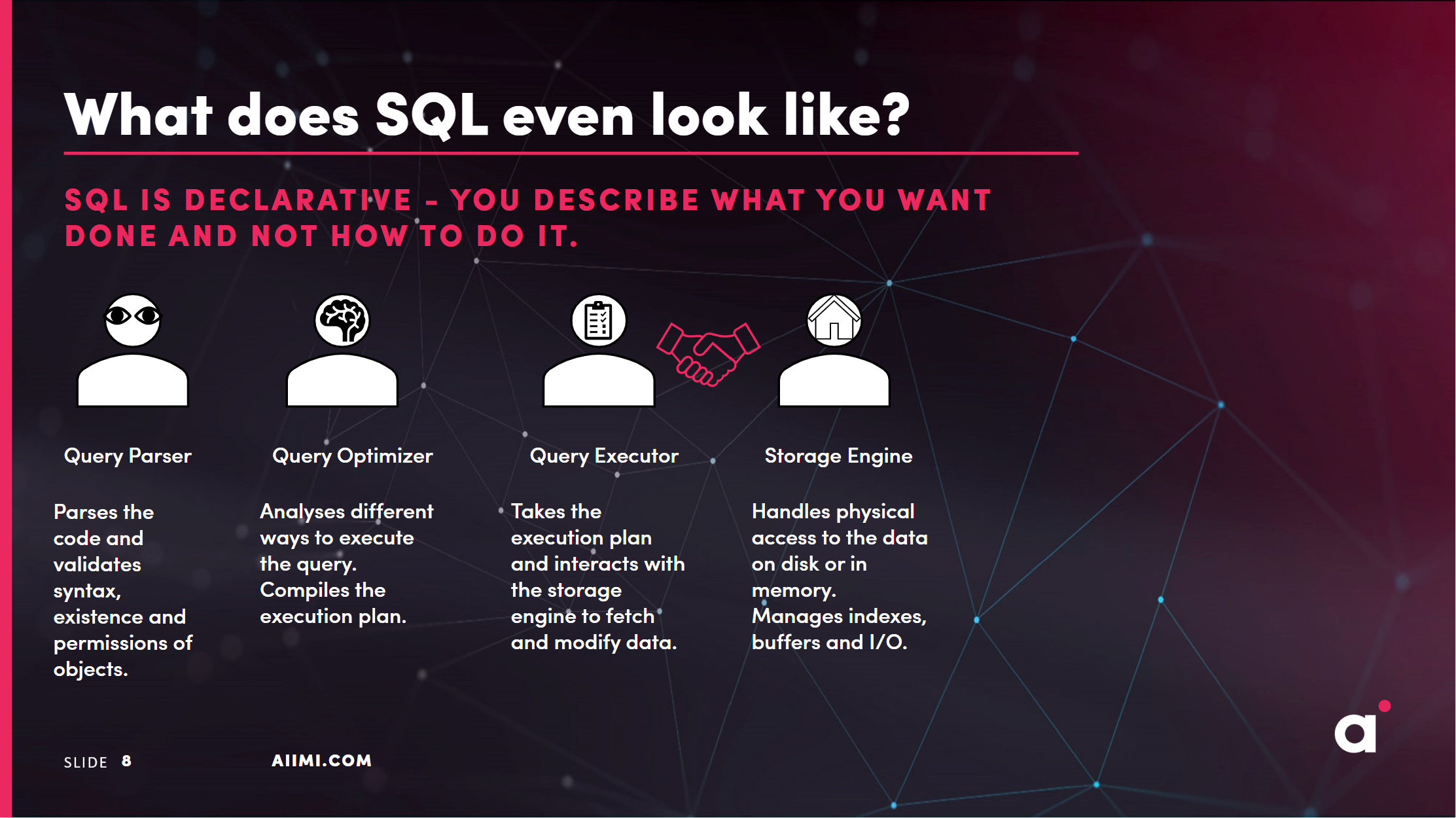
To execute code, SQL uses 4 core components. The parser, optimizer, executer and the storage engine. In this document we won't go into too much detail about how these components work but we will discuss how they work and how temporary tables affect the process.
Temporary Tables
Temporary tables are a special type of table that is created and stored in a system's temporary database (for example tempdb in SQL Server). It's commonly used to create mediation results when executing a query or stored procedure. Temporary tables are automatically deleted when the session or transaction that created them ends. They are usually denoted by a # with no spaces in front of the table name.
CREATE TABLE #TempTable1 (col_id INT, value VARCHAR(25))
In terms of optimization, the use case for using temp tables is that the SQL engine doesn't have to rerun the same code over and over again (unlike a CTE). But does this mean they always go faster?
The trade off with Temporary Tables
Real world SQL code takes up some rather interesting patterns which lead to a degradation of performance. This ranges from inline spaghetti code, missing indexes and the fan favourite, multi-layer nested views. While the negative consequences of these techniques is evident, with temporary tables it's a little bit more subtle.
The main issues with temporary tables revolve around the trade off of performance with readability. when temp tables are created they do not retain indexes which can lead to more physical reads compared to a straight forward sql query. This also leads to the fact that the job of the optimizer is to create an optimal execution plan to make your code more performant. The temp tables bypasses this by telling the optimizer how it should do it's job. Therefore even though it's commonly used as best practice the use of temp tables is not always advised as for enterprise use cases the removal of indices and the lack of attention to the execution plan results in very poor sql performance.
Does this mean use temp tables in every situation? No, does this mean they're bad? No. But it's always useful to understand what your tool/technique can and can't do as the best case scenario in every case is to make sure you use the right tool for the job.
Key links:
aiimi Style Guide
SQL Style Guide
Introduction
This style guide mainly focuses on explicit and consistent code formatting, and not on the actual SQL syntax.
SQL being over 50 years has developed its own "dialects" meaning the SQL you write for Azure T-SQL database will be different to Databricks SQL, and other variants include MySQL and SQLite.
With this in mind this style guide is here to provide simple guidance, database specific rules and syntax will override this.
Things to remember as a consultant
- You might find yourself working in a pre-existing codebase. In this case, you should follow the existing style guide as much as possible, while maintaining readability and consistency.
- You might be working with a team of developers, in this case, you should follow the team's style guide, or all agree on a format that works for everyone.
Good Practice Guidelines
- Always use the schema name when referencing tables.
- Always use full keywords, don't use "NOCHECK" use "WITH NOCHECK" instead.
- Don't be implicit, be explicit. Don't use "SELECT *" use "SELECT column1, column2" instead.
- Always explicitly state the join type, don't use "JOIN" use "INNER JOIN" instead.
- Always use and capitalise keywords like "AS" and "ON".
- Your driving table should more often than not be the table with the least rows returned.
- New lines should be used to make code more readable.
- Use tabs(or 4 spaces, but be consistent) to indent code to make it more readable.
- commas at the start or end of a line, just be consistent.
--Bad practice
SELECT c.company_name,
    c.company_id
    ,u.user_name FROM Companies c
JOIN users AS u
    on u.company_id=c.company_id

--Good practice
SELECT
    c.company_name,
    c.company_id,
    u.user_name
FROM dbo.companies AS c
INNER JOIN dbo.users AS u
    ON u.company_id = c.company_id
Comments
- Comments are not source control
- Comments should not explain how but they should explain what and why we do something
- You can comment with either line comments or block comments it's mostly personal preference.
- -- Is easier and most code editors have hotkeys built in for adding and removing these comments. If you lose the format of your code these can be a nightmare.
- /**/ creates a block comment which will survive bad formatting but is not as widely accepted.
--Bad practice
SELECT c.company_name
    ,u.user_name
FROM dbo.companies AS c
INNER JOIN dbo.users AS u /* Inner join the users on company_id*/
    on u.company_id = c.company_id /*AD 20191108 fix to the join as the alias was wrong*/

--Good practice
SELECT c.company_name
    ,u.user_name
    ,p.nhs_id
FROM dbo.companies AS c
INNER JOIN dbo.users AS u /* Gets the user name which we need to then go get the patient information*/
    ON u.company_id = c.company_id
INNER JOIN dbo.patients AS p
    ON p.patient_id = u.patient_id
views and cte's
- Views and CTE's should be used to make code more readable and reusable.
- Views should be used to store complex queries that are used in multiple places.
- CTE's should be used to make code more readable and to break down complex queries into smaller more manageable parts.
-- No CTE Example
SELECT c.company_name
    ,u.user_name
    ,p.nhs_id
FROM dbo.companies AS c
INNER JOIN dbo.users AS u
    ON u.company_id = c.company_id
INNER JOIN dbo.patients AS p
    ON p.patient_id = u.patient_id
WHERE p.nhs_id = '1234567890'

-- CTE Example
WITH company_users AS (
    SELECT c.company_name
        ,u.user_name
        ,u.company_id
    FROM dbo.companies AS c
    INNER JOIN dbo.users AS u
        ON u.company_id = c.company_id
)
SELECT cu.company_name
    ,cu.user_name
    ,p.nhs_id
FROM company_users AS cu
INNER JOIN dbo.patients AS p
    ON p.patient_id = cu.company_id
WHERE p.nhs_id = '1234567890'

-- View Example
CREATE VIEW company_users AS
SELECT c.company_name
    ,u.user_name
    ,u.company_id
FROM dbo.companies AS c
INNER JOIN dbo.users AS u
    ON u.company_id = c.company_id;

SELECT cu.company_name
    ,cu.user_name
    ,p.nhs_id
FROM company_users AS cu
INNER JOIN dbo.patients AS p
    ON p.patient_id = cu.company_id
WHERE p.nhs_id = '1234567890'
PySpark Style Guide
[IN PROGRESS]
PySpark provides you with access to Python language bindings to the Apache Spark engine.
Here we outline the best practices you should follow when writing PySpark code.
Python linters already exist. This document focusses on PySpark, not on general Python code formatting.
Imports
Never do a from library import * statement. This makes tracking down the source of any methods/functions used incredibly difficult, thus making any refactoring, debugging, or understanding tough and time-consuming.
Instead, be explicit
## bad practice
from pyspark.sql.functions import *

## good practice
from pyspark.sql import functions as F
Now, anytime a function from pyspark.sql is used, we will clearly know.
For example F.col("newCol")
Put all imports at the top of your script/notebook.
Functions
To encourage writing modular code, and to adhere to the DRY principle where possible, functions are preferred to endless inline code.
This provides the added benefits of reusability, testability, and readability. Not to mention debugging benefits.
All functions should, at the very least, have a minimal doc string explaining what the function does.
Type & Return Hints
All functions should include Type & Return hints to reduce ambiguity. This also helps with any AI-assisted programming.
from pyspark.sql import functions as F
from pyspark.sql import DataFrame

def with_ingestion_time(df: DataFrame, new_col_name: str = "ingestionTime") -> DataFrame:
    """
    Adds a timestamp column using the current timestamp
    """
    return df.withColumn(new_col_name, F.current_timestamp())

def with_explode_column(df: DataFrame, column_to_explode: str) -> DataFrame:
    """
    Explodes an array column
    """
    return df.withColumn(column_to_explode, F.explode(column_to_explode))
Chaining
When applying functions to a DataFrame, use the transform method.
## good practice
refinedDf = (
        df
        .transform(with_ingestion_time, new_col_name="ingestionTime")
        .transform(with_explode_column, column_to_explode="userDetails")
    )
This provides supreme readability and clarity for that is being applied to a DataFrame.
Name new DataFrames with a representative variable name. Never do this:
## bad practice
df1 = with_ingestion_time(df)
df2 = with_explode_column(df1)
df3...
df4...
dfN...
User Defined Functions
These should be avoided where possible as they aren't accessible by the Spark Compiler.
How to Contribute
Contributing
To contribute to this repo first clone it, make a new branch, make your changes/additions, commit your code, then open a pull request with your proposed changes.
Example steps...
Clone the repo:
git clone https://github.com/AiimiLtd/de-ai-onboarding.git
Change to the directory:
cd de-ai-onboarding
Create a new branch:
git checkout -b your-new-branch-name
Make your changes.
Commit your changes with a short message:
git add .
git commit -m "added new feature to enhance X"
Push your changes:
git push origin your-new-branch-name
On GitHub, open a pull request (PR) to the main branch of the original repo.
Assign reviewers. Address any feedback from reviewers. Merge Your Changes. Once approved, your pull request will be merged.